- This topic is empty.
Viewing 1 post (of 1 total)
Viewing 1 post (of 1 total)
- You must be logged in to reply to this topic.

Home › Forums › Tech › Office and Applications › How to reset Chat counter in TEAMs
 Udar Gromov
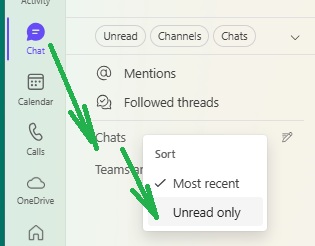
There is simple way to clear the non zero Chat counter in TEAMs.
If there is a nonzero (new) chat counter (a red globe) and you do not see any unread messages in TEAMs, you can click on Chats, right mouse click and select “Unread only” option.
That should display you old forgotten but unread message in some conversation that keep the new chat counter triggered.
© 2017 DomainWebCenter.com. All Rights Reserved. | Disclaimer | Contact the Editor